WhatsApp Updates
Record the consent of a customer and send vehicle updates on WhatsApp
A customer with recorded consent receives a WhatsApp message at each step of the purchase, from the sale to the delivery.
Requirements: WhatsApp updates switched on under Integrations, and the customer update permission, held by the Owner and Manager roles.
Record consent
-
On the customer page, select Record Consent in the WhatsApp Updates card.
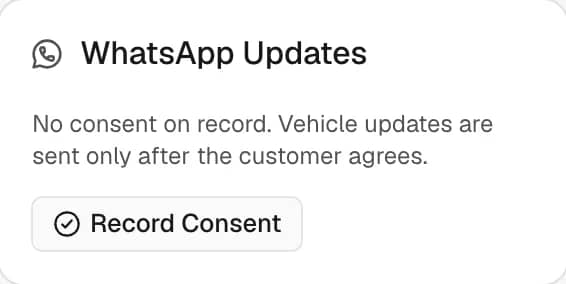
-
Check the Mobile number, with its country code.
-
Read the statement to the customer. After the customer agrees, select The customer agreed to receive these messages.
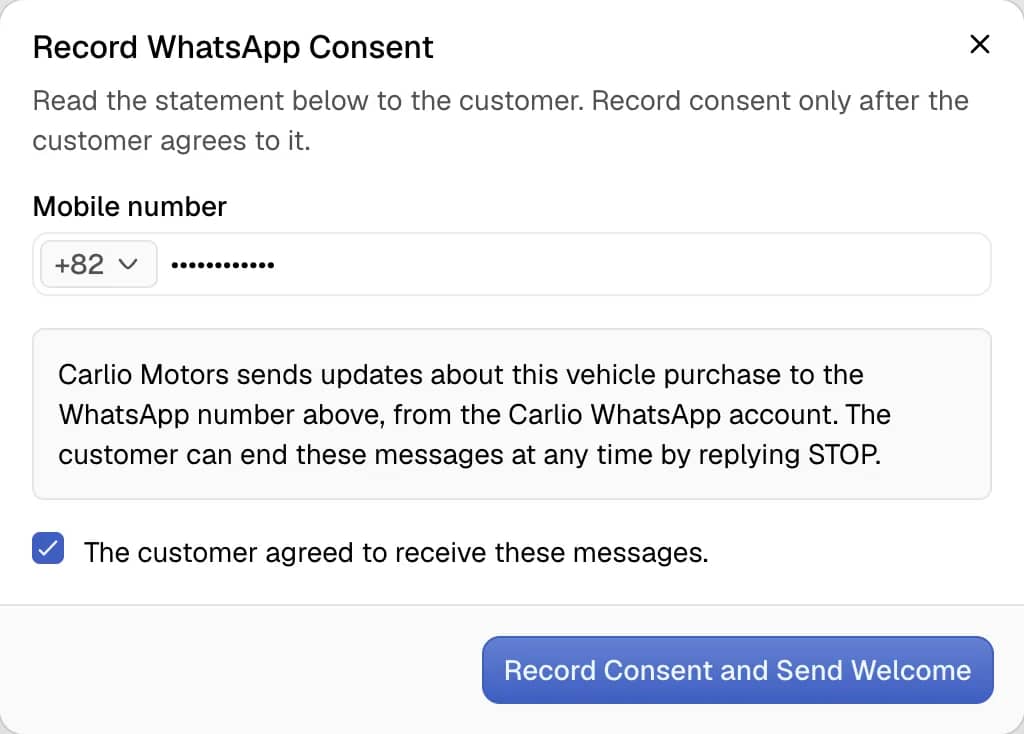
-
Select Record Consent and Send Welcome.
The welcome message goes out at once.
When an update is sent
- The customer is the buyer on an open deal for the car.
- The update is switched on under Integrations.
- For a shipment update, the shipment is under live tracking and set to Visible to Customer.
Replies from the customer appear in the Messages tab.
Status
| Status | Meaning |
|---|---|
| Subscribed | Updates are sent. |
| Unsubscribed | Updates stopped, by the dealership or by the customer. |
| Unreachable | WhatsApp could not deliver to the number. No further updates are sent. |
Change the number
- Select Change Number in the WhatsApp Updates card.
- Enter the new Mobile number, with its country code.
- Read the statement to the person who uses the new number. After that person agrees, select The customer agreed to receive these messages.
- Select Change Number and Send Welcome.
Consent applies to one number, so the welcome message goes to the new number at once and updates to the old number stop. The number already on record cannot be submitted again.
Use this also for an Unreachable number.
Stop updates
Select Stop Updates on the card, or the customer replies STOP. To resume, select Record Consent again.