Transaction List
Search, filter, sort and inspect entries in the ledger
The Transactions page narrows the ledger by text, direction, category and date. The totals below the table follow the same filters.
Requirements
The permission Financial Records Access is required.
Steps
- Open Transactions in the Finance group of the sidebar.
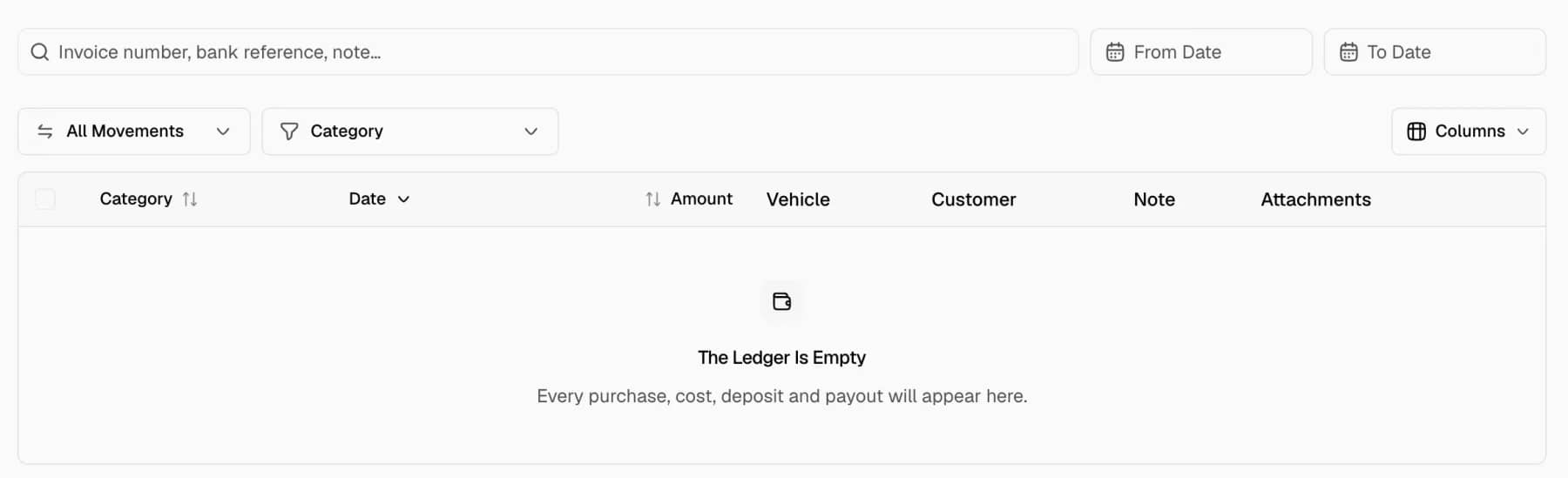
- Enter text in the search field. The placeholder reads Invoice number, bank reference, note…. Each word must appear in the reference or the note of an entry. Capital letters do not matter.
- Set From Date and To Date. Selecting the same date at both ends shows that single day.
- Open the direction menu and select All Movements, Money In or Money Out.
- Open the Category menu and tick one or more categories. The menu groups them as Revenue, Direct Costs and Operating Costs.
- Select a column header to sort. The headers Category, Date and Amount sort the table.
- Select Clear All to remove the search, the dates, the direction and the categories.
The heading shows the number of matching entries. The table shows 25 entries per page. Previous and Next appear when more than 25 entries match.
Read the totals
A bar at the bottom of the table shows In, Out and Net. The bar appears when at least one entry matches.
- In is the sum of all matching money in.
- Out is the sum of all matching money out.
- Net is In minus Out.
The totals cover every matching entry on every page, not only the visible page. All amounts are in the dealership currency.
Choose the columns
Select Columns to show or hide a column. Category and Amount cannot be hidden.
| Column | Shown by default |
|---|---|
| Date, Vehicle, Customer, Note, Attachments | Yes |
| Method, Reference, Deal | No |
The Vehicle column lists the car of the entry. The choice is stored in the browser and applies to the Transactions page only.
Open an entry
Select a row to open the detail drawer. The drawer shows the amount, the direction, the method and the date. It also shows the note, the linked records, who recorded the entry and when, and the attachments.
The Partner link appears only for team members who can read partners. The drawer ends with Open deal or Open car when the entry has a link.
Notes
- The search does not match customer names or car names.
- With no entries, the page shows The Ledger Is Empty. With filters set, it shows No Matching Transactions.
- The page has no spreadsheet export.