Commission Terms
Record what a sales partner earns on one deal
Set commission terms when a sales partner introduces the customer or arranges the sale.
Requirements: The Edit action of an existing deal needs the deal update permission, Deal Financial Access and Partner Commission Access. The figures on the deal page need Partner Commission Access.
Steps
- Open the Open a Deal dialog, or select Edit in the actions menu of an existing deal.
- In Sales partner, select the partner.
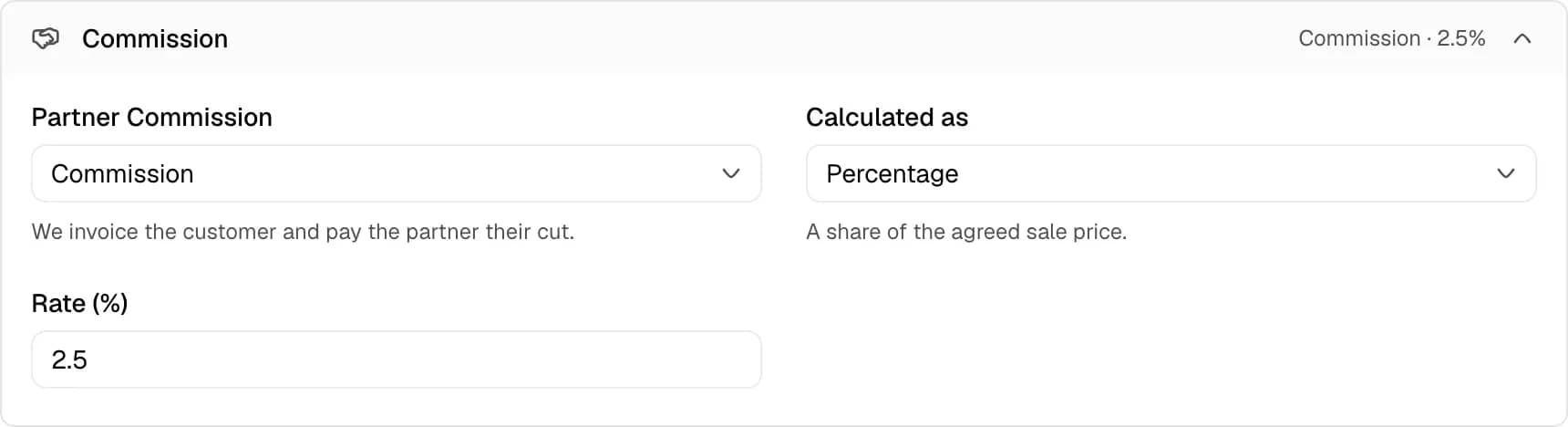
- Open the Commission section. The section opens by itself when the deal already has terms.
- In Partner Commission, select Commission, Markup or Nothing.
- In Calculated as, select Percentage or Fixed amount.
- In Rate (%) or Amount, enter the value. The amount field shows the deal currency.
- Select Open Deal or Save Changes.
Terms
| Term | Meaning |
|---|---|
| Commission | The dealership invoices the customer and pays the partner the agreed cut. |
| Markup | The partner invoices the customer and pays the dealership its price. |
| Percentage | A share of the agreed sale price. |
| Fixed amount | A flat sum, whatever the car sells for. |
| Nothing | No commission on this deal. |
A Commission deal makes the dealership owe the partner. A Markup deal makes the partner owe the dealership the sale price minus the partner cut.
Example
A deal has a sale price of 20,000 and the terms Commission at 2.5 percent. The partner earns 500. The dealership nets 19,500.
Terms from the partner
Selecting a partner copies the standing terms of that partner into the Commission section. Selecting a customer who belongs to a partner does the same. The terms stay editable on the deal. A later change to the standing terms of the partner does not change a deal that already exists.
A percentage carries over unchanged. A fixed amount carries over only when the deal uses the dealership currency. For another currency the Amount field stays empty and must be entered.
When a partner is selected and Partner Commission is Nothing, the dashboard warns that nothing will be paid on the deal.
Where the figures appear
The Financial Summary on the Overview tab shows Partner Takes, Commission and Dealership Nets. Before the deal is won, the label Commission reads Would Earn. The side column shows the same figure under Finance.
Limits
- A percentage cannot exceed 100. The toast reads A commission cannot exceed 100%.
- A fixed amount cannot exceed the sale price. The message reads A fixed commission cannot exceed the sale price.
- A deal with a partner and no terms can still be won. The deal owes the partner nothing.
- The commission amount is fixed when the deal becomes Won. Editing the sale price or the terms of a Won deal recalculates the amount.