Dashboard
Quick Actions
Open the form for a new car, task, deal, customer or partner from the Overview page
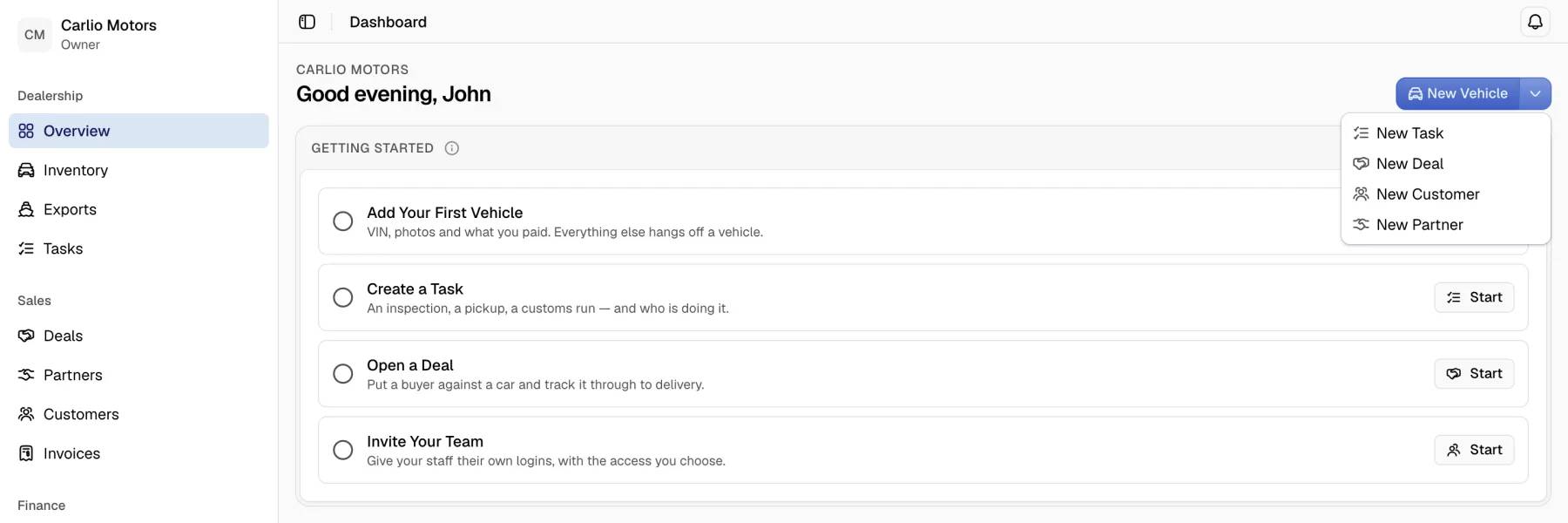
The quick actions are a button group at the top of the Overview page. Each action opens the list page of a record type with the form for a new record already open.
Requirements: the permission to create the record type. An action appears only for a team member who holds that permission. The group is absent when the team member holds none of them.
Actions
| Action | Opens | Permission |
|---|---|---|
| New Vehicle | The inventory with the new car form. | Create cars |
| New Task | The task list with the New Task dialog. | Create Tasks |
| New Deal | The deal list with the new deal form. | Create deals |
| New Customer | The customer list with the new customer form. | Create customers |
| New Partner | The partner list with the new partner form. | Create partners |
Steps
- Open Overview in the sidebar.
- Select the large button at the top. It carries the first action that the team member may use. The order of the table above applies.
- For another action, select the arrow button More Create Options and choose an action.
- Fill in the form that opens. The guides of each area describe the form.
Notes
- A team member with all five permissions sees New Vehicle on the large button. The other four actions are in the menu.
- The quick actions stay at the top of the page while the Getting Started checklist is the only content.
Terms
The action is named New Vehicle in the dashboard. The guides use the word "car".