Language and Formats
Choose the dates, the language, the currency, the formats, the printed texts and the custom fields of an invoice
The Details tab of the invoice form controls how the invoice document reads. The tab is part of the form for a new invoice and for a changed invoice.
Requirements: permission to create invoices to start an invoice, or permission to edit invoices to change one.
New invoices open with the defaults of the dealership. The invoice settings page, under Settings, holds the defaults. These cover the language, the amount format, the date format, the payment terms, the closing note and the custom fields.
Steps
- Open the invoice form and select the Details tab.
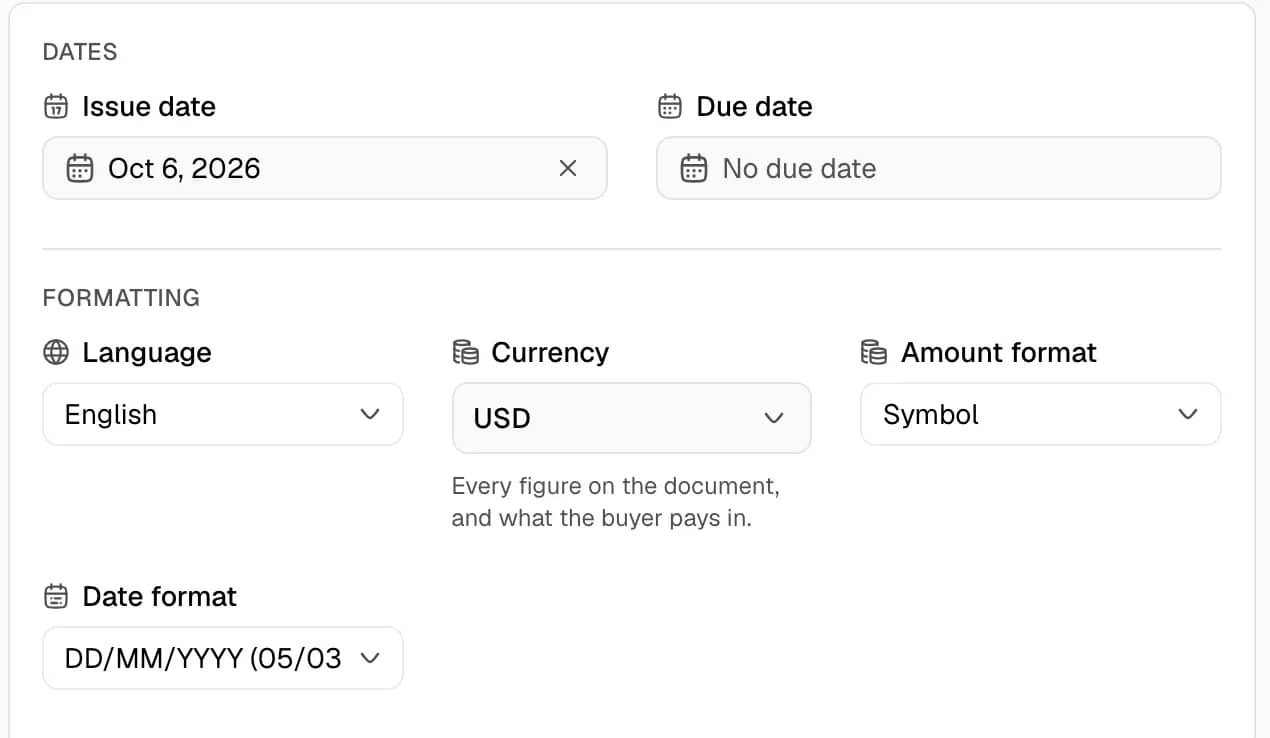
- Under Dates, set the Issue date and the Due date. The Due date is optional. Its placeholder reads "No due date".
- Under Formatting, set the following fields.
- Language: the language of the document. The language is independent of the language of the dashboard.
- Currency: the currency of every figure on the document.
- Exchange Rate: appears only when the currency differs from the currency of the dealership.
- Amount format: how amounts are written.
- Date format: how dates are written.
- Under Document, enter the texts.
- Payment terms: one line, printed in the invoice header under the dates. The limit is 500 characters.
- Closing note: printed at the foot of the document, below the signature. Line breaks are kept. The limit is 1000 characters.
- Internal notes: never printed and never sent to the customer. The limit is 2000 characters.
- Under Custom fields, select Add field. Enter a Label and a Value.
- Select Create Invoice or Save Changes.
Document languages
The Language list offers 13 languages. Each entry shows the English name and the native name. The list is in alphabetical order: Arabic, Azerbaijani, Chinese, English, French, German, Italian, Japanese, Korean, Portuguese, Russian, Spanish and Turkish.
Amount formats
| Option | Example |
|---|---|
| Symbol | $1,234.50 |
| Symbol with region | US$1,234.50 |
| Currency code | USD 1,234.50 |
| Currency name | 1,234.50 US dollars |
| Accounting | ($1,234.50) |
Date formats
| Option | Example |
|---|---|
| MM/DD/YYYY | 03/05/2026 |
| DD/MM/YYYY | 05/03/2026 |
| YYYY-MM-DD | 2026-03-05 |
| Month DD, YYYY | March 05, 2026 |
| DD Month YYYY | 05 March 2026 |
| Mon DD, YYYY | Mar 05, 2026 |
| DD Mon YYYY | 05 Mar 2026 |
Currency and exchange rate
- Every amount on the invoice is entered in the chosen currency. This includes the lines, the discount, the shipping and a fixed tax.
- The Exchange Rate field fills in the published rate for the issue date. The rate can be changed. Only the figure in the books depends on the rate. Nothing on the document depends on it.
- The invoice list shows the total in the invoice currency. The invoice page shows the equivalent in the currency of the dealership below the total.
- Changing the currency clears the rate, and the dashboard fetches a new one.
Custom fields
A custom field is a labelled value that prints in the detail block of the invoice. Examples are a contract number and a warranty term.
- An invoice holds at most 10 custom fields.
- A Label holds up to 60 characters. A Value holds up to 200 characters.
- A row with only a label or only a value is ignored when the invoice is saved.
- A new invoice starts with the custom fields from the invoice settings. An existing invoice keeps its own fields, including none.
Notes
- The amount format and the date format change only how the document prints. They do not change the stored amounts.
- A saved invoice can change its language or formats. Saving generates the document again.