Partners
Add Partners
Create a sales partner record with contact details and standing commission terms
Add a partner to record who brings buyers to the dealership and what the partner earns by default.
Requirements: The partner create permission and Partner Directory Access, held by the Owner and Manager roles. Editing a partner also needs Partner Commission Access.
Steps
- Select Partners in the sidebar.
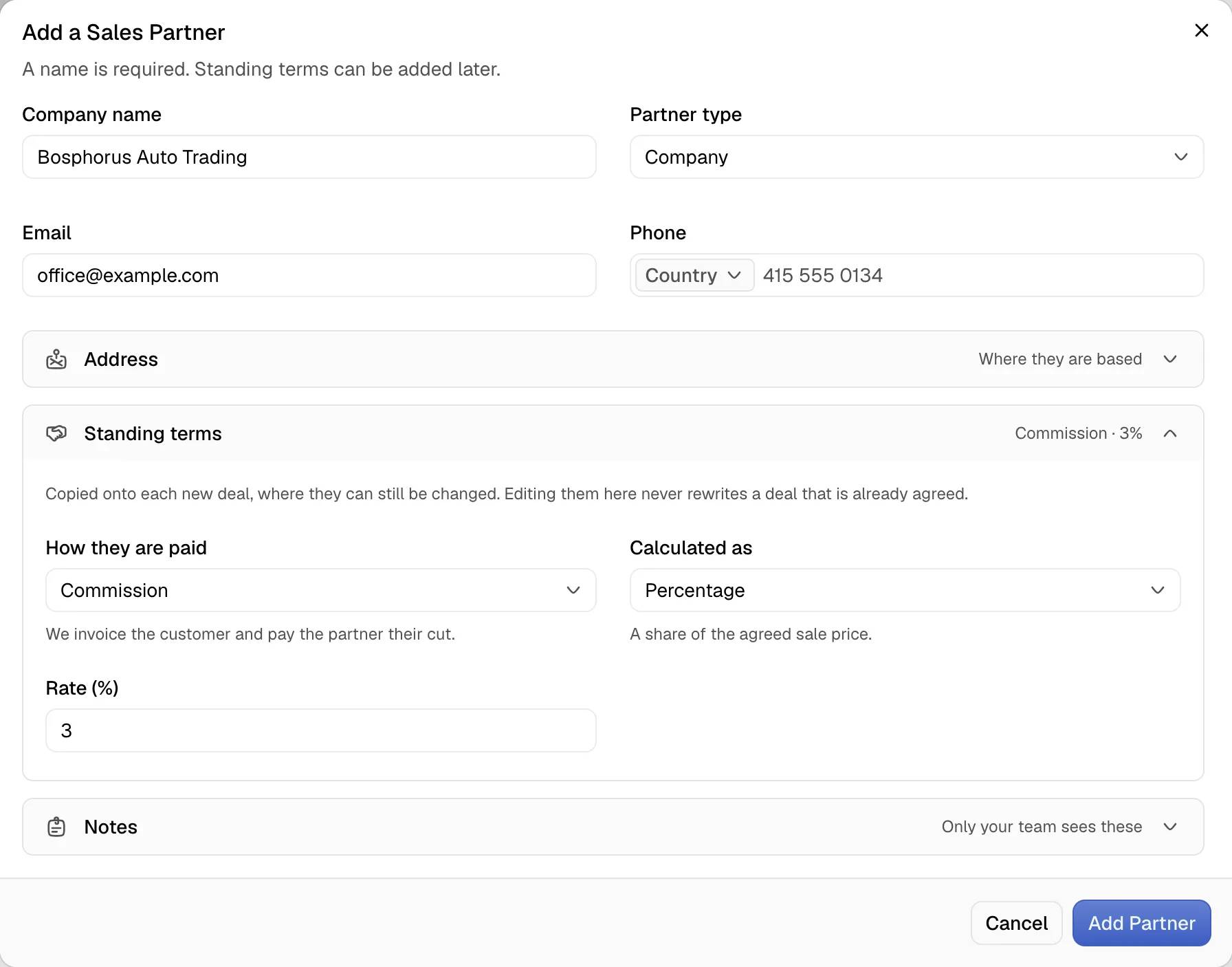
- Select New Partner. The Add a Sales Partner dialog opens.
- In Partner type, select Individual or Company.
- Enter the name in Full name or Company name. The name is the only required field.
- Optional: enter Email and Phone.
- Optional: open the Address section and set Country, City and Address.
- Optional: open the Standing terms section.
- In How they are paid, select Commission or Markup. The option No standing terms means the terms are agreed per deal.
- In Calculated as, select Percentage or Fixed amount.
- Enter the value in Rate (%) or Amount. The amount uses the dealership currency.
- Optional: open the Notes section and enter Internal notes.
- Select Add Partner.
The toast shows the partner name followed by added. The partner appears in the list.
Edit a partner
- Open the partner page.
- Select Edit. The Edit Partner dialog opens with the same fields.
- Change the fields and select Save Changes.
The toast Partner updated confirms the change.
Standing terms
| Term | Meaning |
|---|---|
| Commission | The dealership invoices the customer and pays the partner the agreed cut. |
| Markup | The partner invoices the customer and pays the dealership its price. |
| Percentage | A share of the sale price of each deal |
| Fixed amount | The same sum on each deal, whatever the car sells for |
The standing terms are copied onto each new deal that names the partner. The team member can change the terms on a deal. Editing the standing terms never changes a deal that already exists.
Limits
- A percentage cannot exceed 100. The toast reads A commission cannot exceed 100%.
- A mode needs a rate. Without a rate the toast reads Enter the rate for these terms.
- The internal notes are visible only to the team. The partner never sees them.
- The side column of the partner page shows the terms under Standing rate. The value Not set means no standing terms exist.